5x Faster Cold Starts - is .NET Native AOT worth the trade offs?
Cold starts in a serverless app can really negatively impact the user experience! .NET, typically run in a Just-In-Time (JIT) compilation environment, typically suffers from long cold starts. In this post I’ll discuss how I approach writing Lambda functions using .NET. This includes the packages I use to make things easier to manage and a bit on how I structure the project. I’ll then dive into making it native Ahead-of-time (AOT) compilation compatible, and some of the pitfalls you should be aware of. Lastly, I’ll share a bit of the performance differences I found between AOT compilation and JIT compilation when running on AWS Lambda. Sneak peek - up to 5x faster performance is possible! Bonus - a link to my GitHub repo for this template/project for you to use or reference.
Structuring a Lambda Project
I try to keep each Lambda function performing a single action, and creating multiple functions that could share common behaviour through shared projects. Through the creation of this blog post, I created somewhat of a template for this - feel free to use it yourself! This GitHub repo details the project structure and how to use it, but I’ll share some notable aspects about it here.
    <PackageReference Include="Amazon.Lambda.Annotations" Version="1.9.0" />
    <PackageReference Include="Amazon.Lambda.APIGatewayEvents" Version="2.7.3" />
    <PackageReference Include="Amazon.Lambda.RuntimeSupport" Version="1.14.1" />
    <PackageReference Include="Amazon.Lambda.Core" Version="2.8.1" />
    <PackageReference Include="Amazon.Lambda.Serialization.SystemTextJson" Version="2.4.4" />
    <PackageReference Include="AWSSDK.Extensions.NETCore.Setup" Version="4.0.3.23" />
    <PackageReference Include="Microsoft.Extensions.DependencyInjection" Version="10.0.3" />
My preferred way of using .NET to write AWS Lambda is through the use of Amazon’s Amazon.Lambda.* packages - particularly Amazon.Lambda.Annotations. This enables the use of various Annotations that make it easier to declare parts of the application that apply to various aspects of running your application as a Lambda function.
    [LambdaFunction]
    [HttpApi(LambdaHttpMethod.Get, "/test-data")]
    public async Task<List<Data>> FunctionHandler(ILambdaContext context)
    {
        context.Logger.LogInformation("Received request for test data.");
        return (await dataQuery.GetDataAsync("1")).ToList();
    }
Both the [LambdaFunction] and [HttpApi] provide the means of declaring a method that will be used for the Lambda, and HttpApi makes it easy to wire up to an endpoint that will ultimately be routed to from an API Gateway action.
[assembly: LambdaGlobalProperties(GenerateMain = true)]
[assembly: LambdaSerializer(typeof(SourceGeneratorLambdaJsonSerializer<LambdaFunctionJsonSerializerContext>))]
The [LambdaGlobalProperties] annotation is essential when considering ahead of time compilation - it enables the generation of the main entry point for the Lambda function, instead of relying on JIT or reflection, which would not be compatible with .NET AOT. Especially important, the "Amazon.Lambda.Serialization.SystemTextJson" package enables the use of Source Generators for the serialisation and deserialisation of your JSON inputs/outputs. Stick these lines in an Assembly.cs file in your project and let the magic happen.
This was simple to implement but the most unusual when you work with typical ASP.NET APIs, requiring you to specify the classes you want to be able to serialise or deserialise like below (and thus creating source generated serialisation/deserialisation for those classes):
[JsonSourceGenerationOptions(PropertyNamingPolicy = JsonKnownNamingPolicy.CamelCase, UseStringEnumConverter = true)]
[JsonSerializable(typeof(APIGatewayHttpApiV2ProxyRequest))]
[JsonSerializable(typeof(APIGatewayHttpApiV2ProxyResponse))]
[JsonSerializable(typeof(Data))]
[JsonSerializable(typeof(List<Data>))]
public partial class LambdaFunctionJsonSerializerContext : JsonSerializerContext
{
}
Lastly, "AWSSDK.Extensions.NETCore.Setup" and "Microsoft.Extensions.DependencyInjection" enable a much more familiar means of setting up your application - through the use of a Startup.cs that lets you setup your dependencies through a typical .NET IServiceCollection. This makes use of the [LambdaStartup] annotation to ensure this is run and kept in memory during Lambda initialisation and doesn’t need to re-run for every invocation (i.e. it only runs for cold starts).
[LambdaStartup]
public class Startup
{
    public void ConfigureServices(IServiceCollection services)
    {
        services.AddAWSService<IAmazonDynamoDB>();
        services.AddSingleton<string>(_ => Environment.GetEnvironmentVariable("DYNAMODB_TABLE_NAME") ?? throw new InvalidOperationException("DYNAMODB_TABLE_NAME environment variable is not set."));
        services.AddScoped<DataQuery>();
    }
}This setup requires an Environment variable be set - ANNOTATIONS_HANDLER. This tells the application which function using the [LambdaFunction] annotation to execute, through the use of the method name - in my case the value of the environment variable would be FunctionHandler.
The Fiddly Bits around AOT
I mentioned the change you make in how you handle serialisation in the section above when making your application compatible with ahead of time compilation. However, this is not restricted just to serialisation. In fact, reflection is severely limited. This may not directly affect you, but this and some other limitations of AOT compiled .NET result in a number of libraries not being compatible.
Notably, Entity Framework doesn’t support it yet (though early experimental support is in the works). If you have an existing application or package that depends on Newtonsoft.Json, or if you make use of libraries such as Refit or NLog, you may be out of luck. This is changing all the time so if you are working on such an application, I encourage you to research the current state of your preferred packages before diving into it.
Performance Comparison - AOT vs JIT
This is not a general performance comparison between AOT and JIT compiled .NET. Instead, I focused on the cold start times when running in AWS Lambda functions, and even more particularly with my preferred choice of application setup with source generators and annotations. It is highly likely that being more selective with how you write your application, which dependencies you use and more fine tuning, you can get more performance in either mode.
That being said, this ‘template’ makes it easy for me to get Lambda applications up and running quickly with good enough performance usually. This means I only need to focus on performance improvements further should it become a problem.
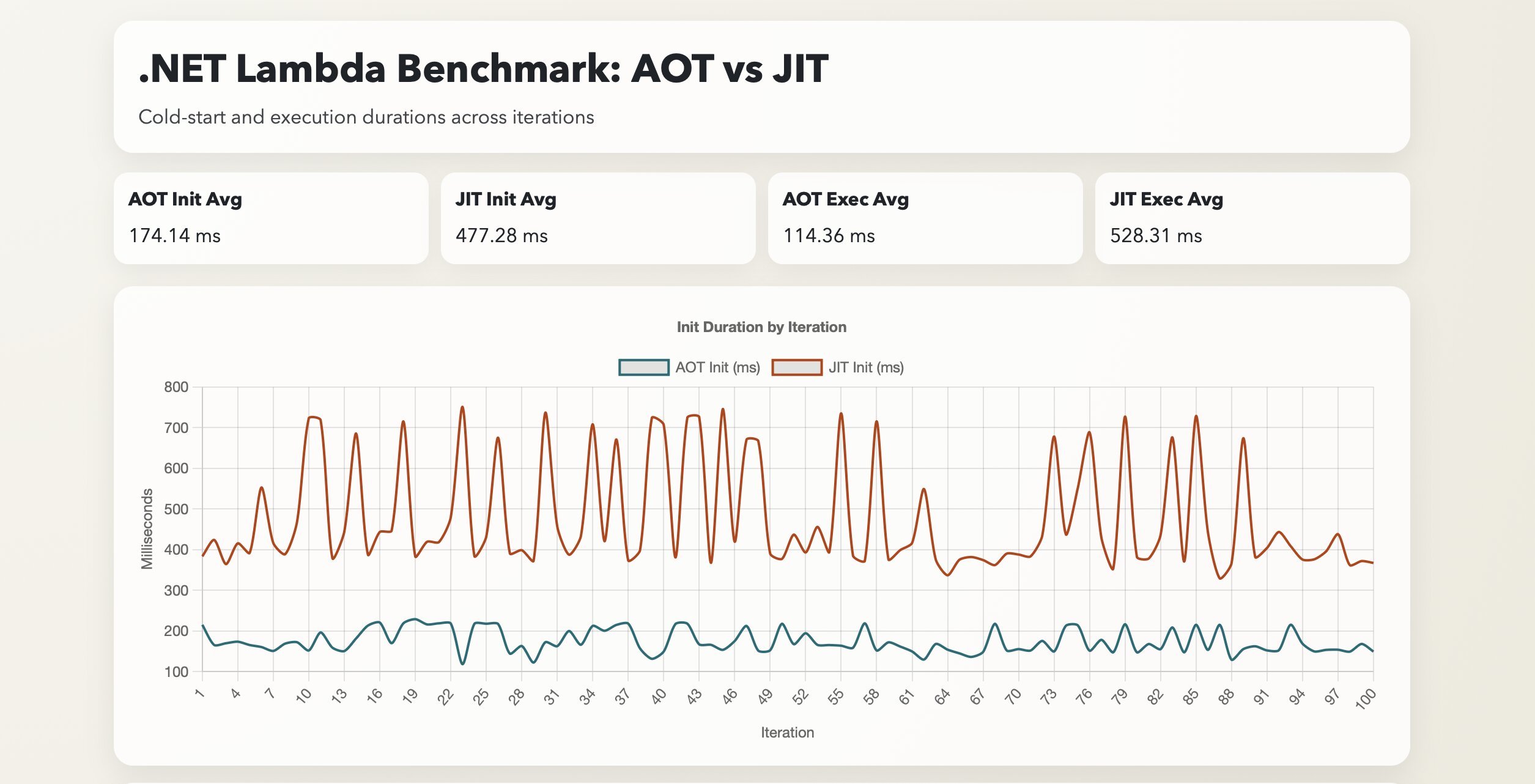
My approach for the benchmark was to simulate repeated cold starts through the use of updating an Environment variable in the Lambda function, forcing an application restart. This is included as a script (bench.sh) in the same repo, along with the results I share below (there is a node.js script analyse.js that can aggregate the results from the csv).
Before the results on the cold start, it is also important to note that the AOT compiled application shipped to AWS was ~14MB in size, which was substantially larger than the JIT version that came in around ~1MB. These are typically stored at object storage pricing and thus such a size difference isn’t a huge concern, but should your application be much larger (or you run many lambda functions), that could be an impact to consider!
First up - the results from the JIT compiled version:
========================================
📊 BENCHMARK RESULTS - JIT (100 Iterations)
========================================

🥶 COLD STARTS (Init Duration):
   Average: 477.28 ms
   P90:     718.41 ms
   P99:     745.72 ms

🔥 EXECUTION TIME (Handler Duration):
   Average: 528.31 ms
   P90:     551.24 ms
   P99:     562.33 ms

========================================
And now the AOT compiled version:
========================================
📊 BENCHMARK RESULTS - AOT (100 Iterations)
========================================

🥶 COLD STARTS (Init Duration):
   Average: 174.14 ms
   P90:     217.26 ms
   P99:     220.36 ms

🔥 EXECUTION TIME (Handler Duration):
   Average: 114.36 ms
   P90:     121.52 ms
   P99:     125.76 ms

========================================These were run under the following configuration settings:
- x86 Architecture
- 1024 MB Memory allocated
I fully expected the Cold Start time (Init duration) improvement - 3-4x faster using AOT compiled .NET, since no compilation step is needed as in the JIT approach. However, I was not expecting the faster execution time of the Handler! Roughly 5x faster there. In fact, I was expecting around the same performance. Perhaps my benchmarking is off or something else is afoot, but since I was focusing on cold starts that may be an investigation for another day.
If ongoing runtime performance is interesting - let me know in the comments of where I post this link (or contact me). If your app tends to run continuously, you may see better performance out of JIT compilation. Though at that point, I may recommend you run it in a different environment than AWS Lambda.
Conclusion
So AOT compilation wins for AWS Lambda, right? Well, as always, the answer is “it depends.” While for the majority of my use cases (a short lived function that spins up, reads/writes to a database and shuts down), it definitely can help dramatically with overall response times to a consuming application, it doesn’t mean it’s always the right choice. Should you need dependencies that aren’t AOT compatible, or if your app isn’t as performance sensitive (it could be reading from a queue for a background job that doesn’t need to meet strict performance SLAs), then you will do just fine with JIT compiled .NET. Furthermore, long running .NET apps tend to benefit from JIT compilation. The compiler can optimise the application over time, sometimes allowing faster performance than AOT compiled code that only gets compiled once.
That being said, .NET AOT improves with every release of .NET, so be sure to keep an eye out on where it goes from here, and feel free to use my template as inspiration for building your own .NET based AWS Lambda functions. Happy coding!